
Launched under the Digital Rajasthan campaign, the portal (sso.rajasthan.gov.in) acts as a centralized hub. Whether you are a student applying for a scholarship, a job seeker looking for the latest RPSC/RSSB recruitment, or a business owner filing for a license, the SSO ID is your mandatory gateway.
| Feature |
Details |
| Official Website |
sso.rajasthan.gov.in. |
| Launched By |
Department of IT & Communication, Govt. of Rajasthan |
| Primary Goal |
Single window for 100+ e-Governance services |
| Top Services |
e-Mitra, Recruitment, Scholarships, Jan Aadhaar, RajKaj |
| Cost |
Free of cost for all users |
Services Available on SSO Rajasthan Portal
The SSO dashboard is divided into G2C (Government to Citizen) and
G2G (Government to Government) apps. Here are the most popular services categorized by user needs:
1. For Students & Job Seekers
- Recruitment Portal: The most used app for applying to RPSC, RSSB, and Rajasthan Police jobs. It includes the One-Time Registration (OTR) feature.
- Scholarship (SJE): Apply for Social Justice and Empowerment department scholarships.
- Haryalo Rajasthan: Portal for environmental and plantation initiatives.
- e-Learning / e-Library: Access to digital study materials and government-curated courses.
- Academic Bank of Credits (ABC): Link your SSO ID to your [suspicious link removed] to manage college credits seamlessly.
2. For General Citizens (Daily Utility)
- e-Mitra: Access 500+ services including electricity/water bill payments and mobile recharges.
- Jan Aadhaar: Update family details, add members, or download your digital Jan Aadhaar card.
- Rajasthan Sampark (181): File complaints or grievances against any government department and track them.
- Mukhyamantri Ayushman Arogya Yojana (MAAY): Manage health insurance benefits and check hospital lists.
- Raj eVault: A digital locker to store your official documents like driving licenses and marksheet securely.
3. For Government Employees
- RajKaj: The official platform for leave applications, ACR filing, and official correspondence.
- SIPF (State Insurance & Provident Fund): Track your PF balance, insurance policies, and loan applications.
- PayManager: Download monthly salary slips and GA-55 forms for income tax filing.
- Attendance MIS: Real-time tracking of office attendance.
4. For Business Owners (Udyog)
- GST Home Portal: Direct access to state GST filings.
- BPAS (Building Plan Approval System): Apply for commercial or residential building map approvals.
- Udyog Aadhaar / BRN: Register new businesses and manage industrial licenses.
Key Features of SSO Rajasthan Portal
The Rajasthan SSO portal isn't just a login page; it's a sophisticated digital engine. Here are the core features that make it the backbone of the state's e-governance.
1. Unified Single Sign-On (SSO) Convenience
The primary feature is the "One ID, Many Services" model. Users no longer need to remember dozens of passwords for different departments like Education, Health, or Revenue. One unique SSO ID provides access to over 200+ government applications.
2. One-Time Registration (OTR) for Jobs
For 2026 recruitment cycles (like RSSB Clerk or Lab Assistant), the OTR feature is a game-changer.
- It automatically fetches your name, DOB, and gender from your Aadhaar/Jan Aadhaar.
- Once verified, you don't have to re-enter personal details for every new job application, reducing errors and saving time.
3. Real-Time Application Tracking
Every application you submit—whether for a Caste Certificate, Scholarship, or RTI—is visible on your personal dashboard. You can track the status (Pending, Approved, or Rejected) in real-time, complete with timestamps.
4. Integrated e-Mitra Services
The portal is seamlessly linked with e-Mitra. This allows citizens to:
- Pay utility bills (Electricity, Water, BSNL).
- Apply for 500+ types of government certificates.
- Recharge mobile and DTH services directly from home.
5. Secure Digital Vault (Document Storage)
All your submitted documents, certificates, and receipts are stored digitally within your SSO profile. This reduces the risk of losing physical paperwork and allows you to download verified copies whenever needed.
6. Multi-Platform Accessibility
- Web Portal: Accessible on any browser at sso.rajasthan.gov.in.
- Mobile App: The "SSO Raj" app (available on Play Store) supports biometric login (Fingerprint/Face ID), making it easy to check updates on the go.
7. Multi-Language Support
To ensure inclusivity, the entire portal is available in both Hindi and English, catering to both rural and urban populations across Rajasthan.
How to Register for SSO ID Rajasthan
The Registration process is free and takes less than 5 minutes. Depending on who you are, choose the category that fits you best.
Step 1: Visit the Official Portal
Go to the official website: sso.rajasthan.gov.in.
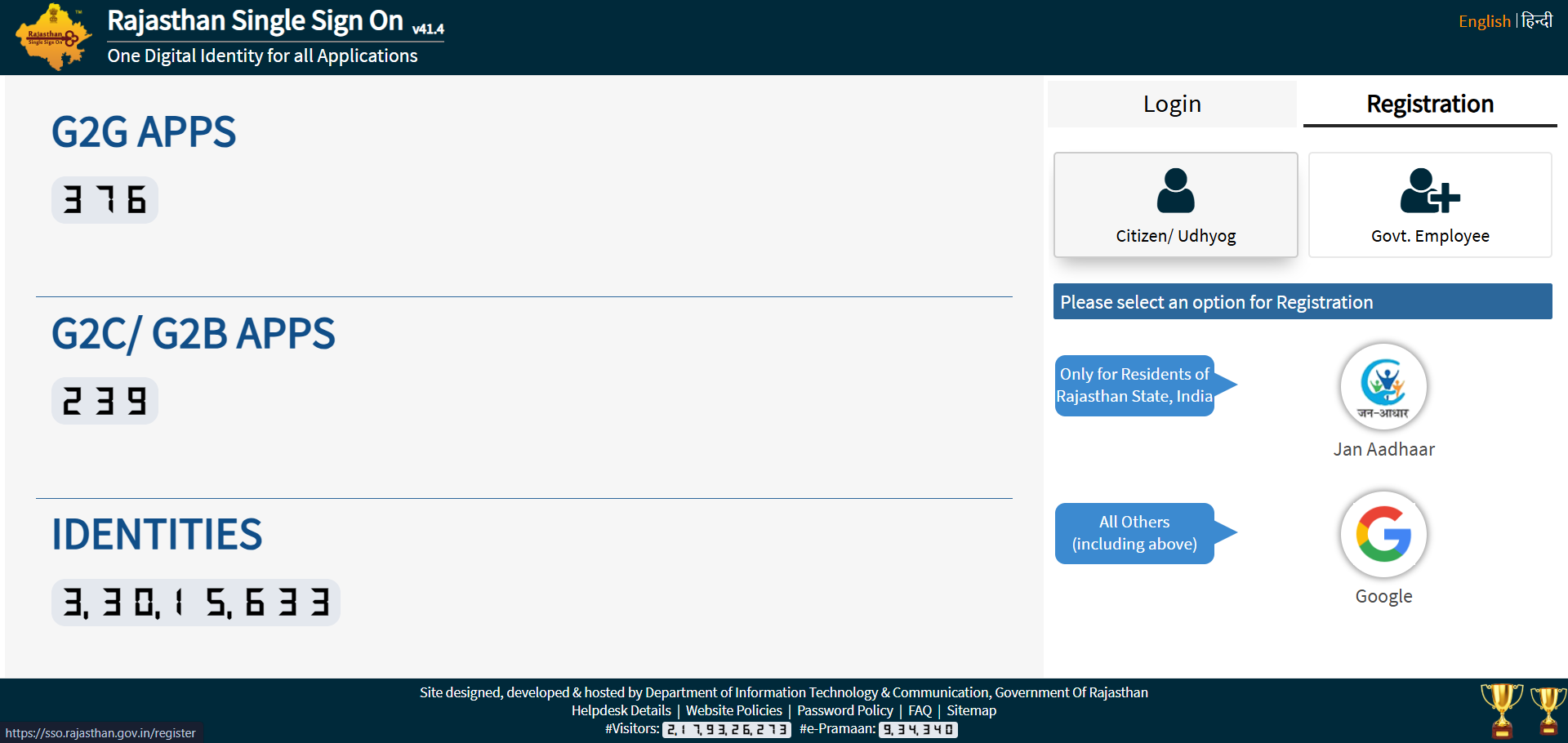
On the homepage, click on the "Registration" tab (next to the Login tab).
Step 2: Select Your Category
You will see three options. Choose the one applicable to you:
- Citizen: For all residents of Rajasthan (Students, Job Seekers, Farmers).
- Udyog: For business owners or industry leaders.
- Govt. Employee: For active Rajasthan State Government employees.
Step 3: Choose Your Registration Method
Option A: For Citizens (Most Common)
- Jan Aadhaar (Recommended): Enter your Jan Aadhaar ID. Select the family member name and click "Send OTP." Verify using the OTP sent to the registered mobile number.
- Google Account: Simply click on the Google icon and log in with your Gmail. (Note: You will still need to link your Aadhaar later for job applications).
Option B: For Govt. Employees
- SIPF ID: Enter your SIPF (State Insurance and Provident Fund) Number.
- Password: Use your Date of Birth in
DDMMYYYY format as the default password (e.g., 05101995 for Oct 5, 1995).
Option C: For Udyog (Business)
- BRN Number: Enter your Business Registration Number to link your firm to the portal.
Step 4: Create Your Credentials
- SSO ID (Username): The system will suggest a username. You can customize it, but it must be unique.
- Password: Create a strong password (e.g.,
Raj@2026#).
- Mobile Number/Email: Ensure your active mobile number is entered for future recovery.
Step 5: Final Submission
Click on the "Register" button. You will see a success message, and your new SSO ID will be sent to you via SMS and Email.
Troubleshooting Common Registration Issues
- OTP Not Received: Ensure your mobile number is linked to your Aadhaar/Jan Aadhaar.
- Error "ID Already Exists": You might have created an ID in the past. Use the "Forgot SSO ID" tool on the login page.
- Jan Aadhaar Member Not Showing: Ensure your name is correctly updated in the Jan Aadhaar family list.
One Time Registration (OTR) 2026
The One Time Registration (OTR) system was introduced to eliminate the hassle of entering personal details and paying fees repeatedly for every single government job application. Pay once, register once, and apply for multiple vacancies!
How to Complete OTR on SSO Portal
- Access the Portal: Log in to your SSO account and click on the "Recruitment Portal" icon.
- Start OTR: On the dashboard, locate and click the "One Time Registration" button.
- Choose Verification Type:
- Aadhaar/Jan Aadhaar (Recommended): This will automatically fetch your Name, Father's Name, DOB, and Gender.
- SSO Profile: Only use this if you do not have Aadhaar/Jan Aadhaar (additional document uploads like 10th marksheets will be required).
-
Fetch & Verify Details: Once the data is fetched, check it carefully. In 2026, most details (except mobile and email) can be corrected after the OTR number is generated, but it’s best to be accurate the first time.
-
Educational Details: Link your Academic Bank of Credits (ABC) ID here to sync your degrees and marks digitally.
OTR Fee Structure 2026
The government has implemented a "Single-Time Fee" policy. Once you pay this, you won't pay for individual job applications like CET, LDC, or Patwari in 2026.
| Category |
OTR Fee |
| General / OBC (Creamy Layer) / Other State |
₹600 |
| SC / ST / OBC (NCL) / EWS / PwD (Rajasthan) |
₹400 |
Important Note: If you are from another state, you will be treated as a "General" candidate in Rajasthan and must pay ₹600.
Important 2026 Alerts for OTR
- Correction Window: If you make a mistake, there is usually a ₹300 correction charge. Ensure your data matches your Class 10th Marksheet exactly.
- Face Authentication: Some high-security recruitments in 2026 now require "Face Authentication" during OTR to prevent impersonation.
- Deadlines: For major 2026 exams like the LDC (10,644 posts) or Lab Assistant, OTR must be completed before the form's last date (e.g., February 13, 2026, for LDC).
How to Login to SSO Rajasthan (Step-by-Step)
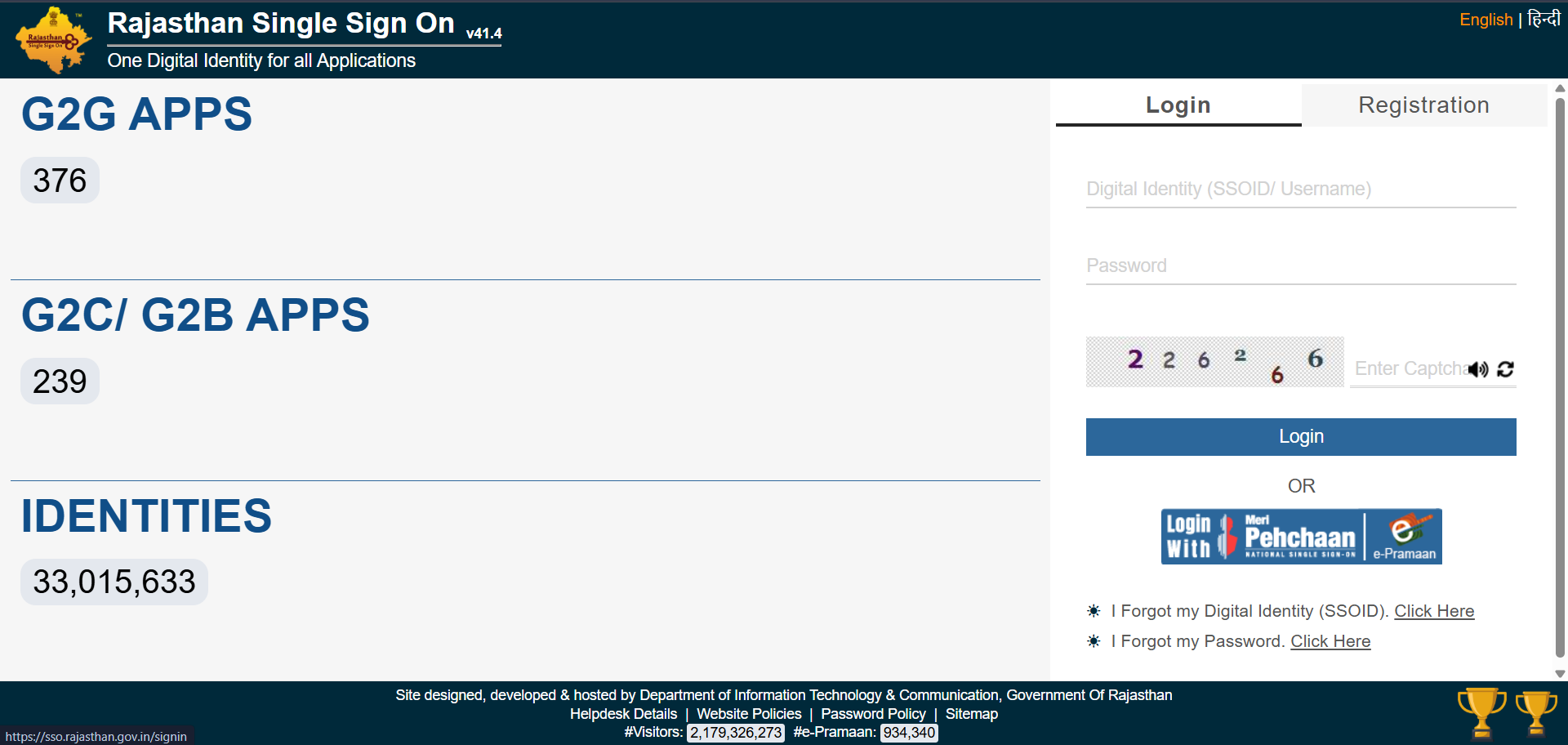
The login process is the most searched query for the portal. Follow these steps for a successful login in 2026:
-
Go to the Official Link: Open your browser and visit
sso.rajasthan.gov.in.
-
Enter Your Credentials:
- SSO ID / Username: Enter the digital identity you created during registration.
- Password: Enter your secret password.
-
Security Captcha: Type the 6-digit number shown in the image box exactly as it appears.
-
Click Login: Tap the "Login" button to access your personalized dashboard.
Trouble Logging In? Quick Fixes
If you see an error message, don't worry. Here are the most common solutions:
| Common Error |
Solution |
| "Invalid Username/Password" |
Use the "Forgot SSOID" or "Forgot Password" links below the login button. |
| "Your connection is not private" |
Check if your device's Date and Time are correct. Incorrect time often triggers this security error. |
| Captcha Not Showing |
Clear your browser Cache and Cookies or try opening the site in Incognito/Private mode. |
| OTP Not Arriving |
Ensure your mobile number is correctly linked to your Jan Aadhaar or Aadhaar card. |
Forgot SSO ID or Password? (2026 Instant Recovery)
Getting locked out of your account is common, but Rajasthan's SSO portal offers two quick ways to get back in.
1. How to Recover Forgotten SSO ID
If you don't remember your username, you can retrieve it instantly via SMS or Online.
-
Via SMS (Fastest): From your registered mobile number, send the following message:
SMS: RJ SSO to 9223166166
-
Via Website:
- Go to the SSO Login Page.
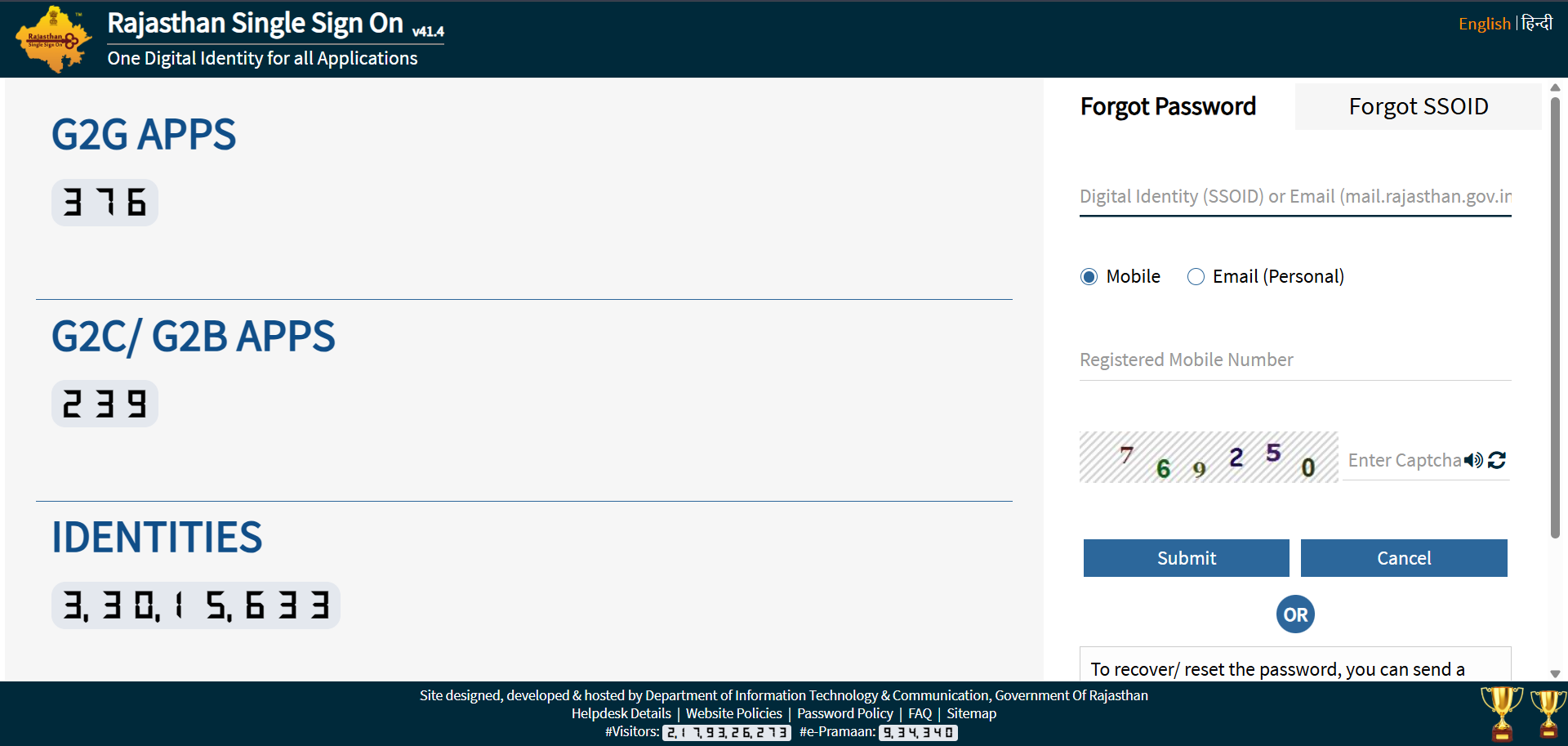
- Click on "I Forgot my Digital Identity (SSOID)".
- Select your identification (Jan Aadhaar, Aadhaar, or Google).
- Verify the OTP sent to your phone. Your SSO ID will appear on the screen.
2. How to Reset Forgotten Password
If you know your ID but forgot the password, follow these steps:
-
Online Method: Click the "Forgot Password" link on the login page. Enter your SSO ID and choose to receive an OTP via Mobile or Email. Once verified, you can set a new strong password.
-
Via SMS: Send
RJ SSO PASSWORD to 9223166166. (Note: This only works if you have logged in at least once in the last few years).
Merging Multiple SSO IDs
Many users accidentally create two IDs (e.g., one with Google and one with Jan Aadhaar). This can block you from applying for jobs or scholarships because your Aadhaar can only be linked to one ID.
Step-by-Step to Merge IDs:
- Login to the SSO ID you want to keep/active (usually your Government Employee ID or your primary Citizen ID).
- Click on the "Edit Profile" (Pencil icon) at the top of the dashboard.
- Scroll to the bottom and click the "Deactivate Account" button.
- A confirmation pop-up will appear. Select the option to Merge with another ID.
- Enter the Secondary SSO ID you want to merge into this one.
- Verify via OTP. Once successful, all your data from the old ID will be transferred, and the duplicate account will be deleted.
How to Update Jan Aadhaar Card via SSO (2026 Guide)
Updating your Jan Aadhaar is now a mandatory step for availing of any Rajasthan government scheme (like Chiranjeevi Health Insurance or Anuprati Coaching). You can do this for free using your SSO ID.
Phase 1: Mandatory E-KYC (First Step)
Before you can edit any details (Income, Name, or Address), you must complete the E-KYC for all family members above 5 years of age.
- Log in to sso.rajasthan.gov.in.
- Click on the Jan Aadhaar icon (Citizen App).
- Select the "Jan Aadhaar E-KYC" portal.
- Authenticate using the Aadhaar OTP of each member. This will automatically sync their Name, DOB, and Gender from their Aadhaar card.
Phase 2: Updating Information (Editing)
Once E-KYC is done, follow these steps to update other details:
- Open Enrollment: Click on the "Citizen Editing" icon within the Jan Aadhaar app.
- Select Member: Choose the family member whose data needs changing.
- Update Details: You can now change:
- Income: Upload a scanned copy of the latest income certificate.
- Bank Account: Upload a passbook or cancelled cheque.
- Mobile Number: Enter the new number and verify via OTP.
- Address: Upload a Water/Electricity bill or Mool Niwas (Domicile).
- Save & E-Sign: Click on "Save," then click "E-Sign." You will need to verify this final step with an OTP from the Head of Family’s (HoF) mobile.
Documents Required for Jan Aadhaar Update
| Update Type |
Required Document (Scanned PDF) |
| Income Update |
Self-declaration or Income Certificate (I, J, K forms) |
| Bank Details |
Bank Passbook or Cancelled Cheque |
| New Member |
Birth Certificate & Aadhaar Card |
| Marriage Update |
Marriage Certificate |
| Land Details |
Jamabandi (for Farmer benefits) |
How to Check Jan Aadhaar Update Status
After you submit your request, it goes through a two-level verification (Gram Panchayat/Municipal level and District level). It usually takes 7 to 15 days to reflect.
- To Check: Click on the "Enrolment Status" icon in your Jan Aadhaar dashboard.
- Green Checkmark: Means the update is successful.
- Red Cross: Means the request was rejected (usually due to a blurry document upload).
SSO Rajasthan Official Support
| Service Type |
Contact Details |
| Helpline Number (General) |
0141-2925554 / 0141-5123717 |
| Alternate Helpline |
0141-5153222 |
| Email Support |
helpdesk.sso@rajasthan.gov.in |
| Jan Aadhaar (Toll-Free) |
1800-180-6127 |
| Job Recruitment Help |
7340557555 / 9352323625 |
| Support Hours |
Mon - Fri (10:00 AM to 6:00 PM) |
FAQs
1. Can a person from another state (outside Rajasthan) register for an SSO ID?
Yes. Anyone can create an SSO ID using a Google/Gmail account. While many services are for Rajasthan residents only, candidates from other states need an SSO ID to apply for Rajasthan government jobs (RPSC/RSSB) under the General category.
2. Is there any age limit to create an SSO ID?
There is no official age limit to create an ID. However, for students, it is usually created when they reach the age for scholarship applications (Grade 6+)
3. What should I do if the SSO website is not loading or shows "Server Busy"?
The portal often experiences high traffic during the last dates of major recruitment exams (like LDC or CET). If the site is slow, try clearing your browser cache or accessing the portal during "off-peak" hours (late night or early morning). You can also try the official "SSO Raj" mobile app as an alternative.
4. How can I change my Name or Date of Birth in my SSO Profile?
If your profile is linked to Jan Aadhaar or Aadhaar, you cannot edit your name or DOB directly in the SSO portal. You must first update these details in your Aadhaar/Jan Aadhaar record. Once the government updates your primary ID, log in to SSO and click the "Fetch" or "Update Profile" button to sync the new data.